Highlights
Migrated 300+ VMware VMs and over 100 TB of data within two weeks. All workloads, including critical production workloads, were switched over as scheduled with zero data loss.
Replaced VMware vSAN while reusing all hardware across 10+ servers.
Unified deployment and management of CPU nodes across generations, including Intel Xeon E5 and 1st, 2nd, and 5th Generation Xeon Scalable processors.
Ran all production systems and databases, including a self-developed MES, big data and SAP, on the SmartX ECP, with stable operation for nearly one year.
A leading automotive components manufacturer provides high-quality products and services to many domestic and international automotive brands through its strong R&D and manufacturing capabilities.
As VMware adjusted its portfolio strategy, the company’s existing VMware vSAN infrastructure faced new challenges in business continuity, cost control, and long-term evolution. The company therefore planned a large-scale replacement of its vSAN clusters and defined three requirements for the alternative solution:
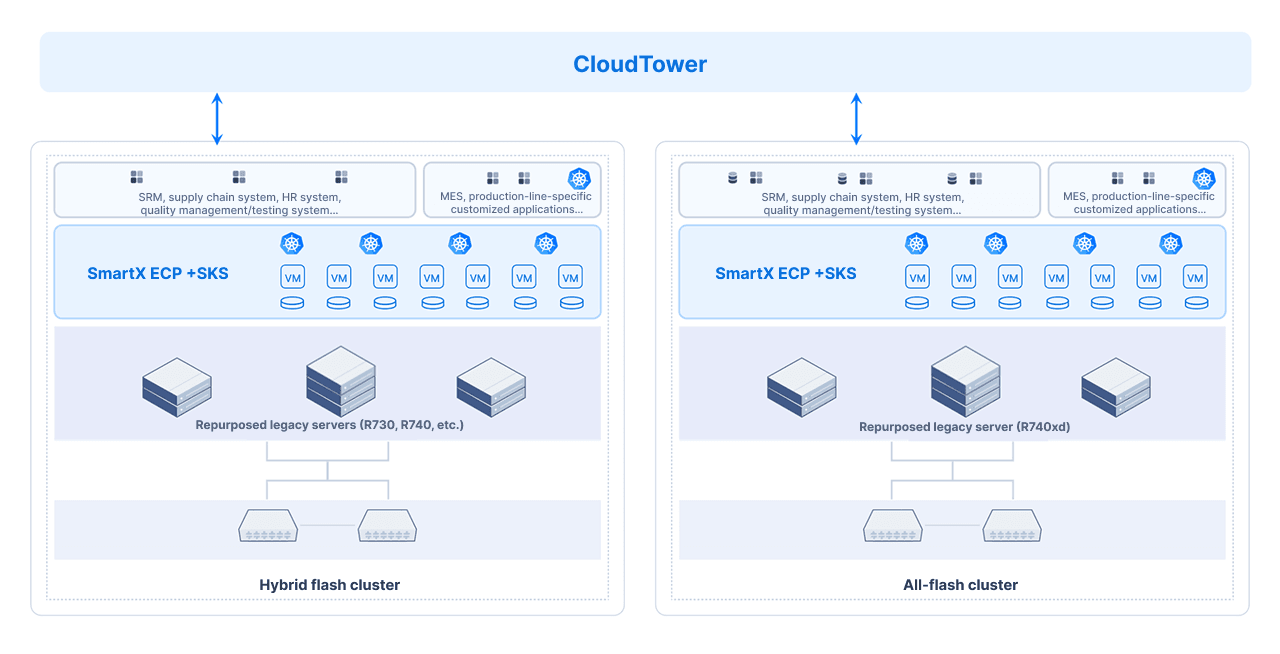
Reuse all hardware and unify heterogeneous resource management: Reuse existing servers with CPUs of different generations, including Dell R730, R740, and R740xd, to enable unified management of heterogeneous resources and support smooth expansion as needed.
Migrate core workloads smoothly: While controlling new resource investment, minimize the impact of migration on production workloads and ensure the cutover of core workloads (MES, ERP, SCADA, WMS) within the planned short downtime windows.
Support sustainable evolution: Gradually introduce advanced infrastructure capabilities including container services, file storage, networking and security, backup and disaster recovery, and model governance as business needs evolve.
After extensive evaluation, the company selected SmartX ECP to replace VMware vSAN and upgrade its infrastructure. Through a workload prioritization and phased migration strategy, it migrated 300+ business VMs in batches and reused all hardware across 10+ servers.
Migration Planning: Tool Selection, Workload Prioritization, and Risk Assessment
The original environment consisted of mixed-flash and all-flash VMware vSAN clusters, supporting all production workloads at the main factory. More than 300 VMs ran on the clusters, storing over 100 TB of data. Overall resource utilization rate was high, leaving limited capacity for migration scheduling and temporary hosting. The company also planned to migrate all VMs within two weeks, while core production workloads could be switched only during short time windows.
To meet this goal, the company planned the migration based on the production environment, workload importance, and downtime requirements. With support from SmartX engineers, the company worked on workload prioritization, migration sequencing, and risk identification to prepare for batch migration and smooth cutover.
Selecting Migration Tool: Migrate Workloads in Batches Through SMTX Migration Tool
The company selected SMTX Migration Tool to balance business continuity and migration efficiency. The migration combined full and incremental transfers and proceeded in batches by workload prioritization. Lower-risk workloads were migrated first to release source nodes and create capacity for the SmartX cluster.
Phased migration and hardware reuse improved overall efficiency while maintaining business continuity. It also helps to reduce one-time resource investment and the risk of a concentrated cutover.
Workload Prioritization and Dependency Mapping: Defining the A/B/C Migration Sequence
To plan migration batches properly, the company first classifies all business VMs into four tiers, A, B, C, and Special, based on business continuity, data capacity, and available migration windows. It then adopts a high-risk validation, custom-window batching, and drill-before-cutover strategy to complete VM migration and business cutover in batches. The specific strategies are as follows:
Category | Business Continuity | Typical Business Systems | Migration Strategy |
Tier A | Mission-critical workloads with the highest priority, where downtime would impact overall production operations. | MES, Automation systems, SAP, etc. | Core workloads are first moved to a temporary staging environment and scheduled for the final phase. Before cutover to SmartX clusters, migration rehearsals and simulated startups are run through SMTX Migration Tool to verify system and application availability. |
Tier B | Important workloads where downtime may cause a single system broadly unavailable and disrupt normal operations. | SRM, supply chain systems, R&D and laboratory management systems, APS, etc. | Migrated in batches within windows confirmed by the business teams as second-priority, typically on weekends or during off-peak hours on workdays. Data synchronization, simulated startups, and workload validation are completed before migration to reduce cutover risk. |
Tier C | Important but non-core workloads whose downtime is relatively manageable and does not directly affect overall production. | HR, quality management and testing, finance and tax, O&M management, and back-office systems, etc. | General or flexibly scheduled workloads are migrated in batches based on resource scheduling and migration windows. Testing, support, and non-critical production VMs can be migrated flexibly after confirming their impact. |
Special | Special VMs. | AD Domain, licensing-bound systems, and other special workloads. | For AD, rebuild and import data. For license-bound systems, reuse the existing license by modifying binding attributes such as MAC address and hostname. If not possible, contact the vendor in advance to regenerate license keys. |
The company also mapped dependencies among workload systems and adjusted migration batches based on application call chains. As for the data platform classified as Tier B but providing data services and application calls for multiple Tier A workloads, the company included it in the later Tier A migration batch given its support for core workloads and the cutover impacts of upstream and downstream systems. This avoided synchronization issues among related systems and supported a smooth cutover of core workloads.
Migration Risk Identification
Before migration, the company investigated potential risks involving network performance, system compatibility, data consistency, and infrastructure health, and prepared mitigation measures:
Network and performance: Investigated peak IOPS and bandwidth, evaluated network links, latency, bandwidth, and throttling during migration windows, controlled each task at 300–400 Mb/s and total concurrent migration at 1–2 GB/s, and used concurrent migration across multiple nodes to reduce the impact of migration peaks.
Operating system compatibility: Reviewed OS versions including Windows, SUSE, and CentOS, as well as drivers and boot modes. For some Windows Server 2003 workloads, it planned offline import and export migration beforehand.
Database consistency: Stopped database instances or froze writes before cutover, validated consistency with test data, checked file capacity and directory structures, and involved the company’s application team in verification.
Licensing and identity: Mapped bindings including licenses, host fingerprints, MAC addresses, BIOS UIDs and accounts to avoid licensing or identity issues after migration.
Legacy system configuration: Checked legacy patches, system parameters, mount configurations, and unknown dependencies to reduce their impact.
Source data and hardware health: Checked failed disks, bad blocks, array status, and source-side readability to identify data and hardware risks early.
Phased Migration: Using Temporary Cluster to Create Migration Windows
Considering the limited capacity of the original cluster, the company adopted a phased approach: migrate out one batch, rebuild one batch, and migrate one batch back, gradually releasing and reusing the existing hardware. All VMs were migrated smoothly to the SmartX ECP environment within the planned schedule:
Build a temporary environment: Deployed a staging cluster and configured networking, storage, migration components and resource pools to provide temporary capacity.
First relocation: Moved high-load, high-importance VMs to the staging environment first, reducing source-cluster capacity rate to about 40%–50%. Gradually released nodes from VMware mixed-flash and all-flash clusters, performed hardware checks and compatibility remediation, and installed SmartX ECP software.
Build the initial SmartX ECP clusters: Used the released servers to build SmartX mixed-flash and all-flash ECP clusters. Migrated Tier C first to validate paths, business access and platform capacity, then migrated Tier B and special workloads after validation.
Release and expand in phased stages: Continued releasing nodes from VMware all-flash cluster and added them to the SmartX all-flash cluster. The result was two SmartX ECP clusters that balanced workloads between them.
Concentrated cutover of core workloads: After migrating Tier C and most Tier B workloads and synchronizing Tier A data, used a production-line shutdown window to cut over most Tier A and closely related Tier B. Migrated the small number of workloads without fixed downtime windows in subsequent batches.
Migration Results: From vSAN Replacement to Production Workload Hosting
Through workload prioritization, phased migration and staging-cluster design, the company replaced VMware vSAN and migrated 300+ VMs and over 100 TB of data within two weeks, migrating more than 100 TB of data. All workloads were switched over within scheduled windows with zero data loss.
By now, SmartX ECP has hosted core workloads at the main factory, including WMS, SAP, SCADA, SRM, MES and the data platform, as well as multiple self-developed applications including SQL Server, MySQL databases and AD domains. The environment has remained stable for nearly one year.
The company has reused more than 10 existing servers and added a small number of new nodes as needed. With SmartX ECP’s strong compatibility with heterogeneous CPUs, the company unified deployment and management of nodes equipped with Intel Xeon E5 and 1st, 2nd, and 5th Generation Xeon Scalable processors. This further improved operational efficiency and provided a flexible and sustainable foundation for future expansion.
Outlook
Following SmartX ECP’s stable performance in production, the company introduced SMTX Kubernetes Service (SKS). By building unified virtualization and container resource pools, it is moving self-developed workloads from standalone Docker deployments toward standardized Kubernetes cluster management.
Going forward, the company will continue improving its enterprise cloud platform based on business needs, supporting stable workload operation, rapid delivery of self-developed applications and future digital business growth.
References
SmartX - SmartX ECP
SmartX - VMware Alternative Solution


