Highlights
- SmartX ECP hosts all business systems previously running on the traditional vSphere infrastructure, cutting hardware investment by more than 30% and software costs by more than 85%.
- Using the SMTX Migration Tool, the school’s IT team independently completed a smooth migration of 40+ business VMs.
- The school reused its existing Synology NAS for data backup, preserving prior investments while simplifying backup management.
- The deployment established a repeatable, standardized approach to VMware replacement and infrastructure modernization, laying the groundwork for a unified IT foundation across multiple campuses.
A leading private international school in Shanghai is a pioneer in China’s K-12 education sector. It has ranked among the top schools for several consecutive years in both the Forbes China International Schools Selection – Bilingual High Schools category and the Hurun Education Top International Schools in China.
As teaching and administrative operations have expanded across multiple campuses, the school’s core business systems have placed higher demands on the stability, availability, and operational efficiency of its IT infrastructure.
Background: Cost Challenges of the Traditional VMware Architecture
The school currently operates three campuses. Campus A originally had three physical servers in its data center hosting core systems, while the other two campuses deployed a total of six physical servers for additional business systems.
The infrastructure stack was largely consistent across campuses: HPE servers + VMware vSphere + NetApp centralized storage + Synology NAS backup. Each campus used a single centralized storage system, without an active-active storage setup. As the school’s digital infrastructure continued to evolve, the legacy architecture began to present several challenges:
- Outdated virtualization version: The school’s existing vSphere version was old and no longer officially supported. It was difficult to support some newer business systems, and security vulnerabilities could not always be patched promptly.
- High hardware and software refresh costs: The existing servers had been used for many years and were approaching refresh cycles, while hardware prices continued to rise. On the software side, VMware’s subscription model changes had sharply increased the cost of vSphere. Continuing to use the existing VMware vSphere + centralized storage architecture would cost two to three times as much as before, well above the school’s budget.
The school therefore needed a VMware alternative that could keep existing business systems running smoothly while providing more predictable costs, simpler operations, and room for long-term expansion. It also wanted to improve hardware utilization and establish a foundation for standardized IT infrastructure upgrades across its campuses.
Solution Evaluation: Move Beyond VMware Replacement to Infrastructure Modernization
Architecture Choice: Virtualization-Only Solution vs. Hyperconverged Architecture
Once the school had decided to replace VMware, it faced two main options: replace only the virtualization layer with KVM, Hyper-V, or a similar virtualization-only solution; or adopt a hyperconverged architecture and modernize the infrastructure as a whole. The IT team compared the two approaches in detail:
| Comparison Dimension | Virtualization-Only Solution (KVM/Hyper-V) | Hyperconverged Solution | Decision Rationale |
| Operational Complexity | High. Compute, storage, and networking must be managed independently, increasing complexity. | Low. Compute, storage, and networking are integrated and managed through a unified platform. | The school’s limited IT resources require lower operational complexity. |
| Architectural Approach | Traditional. Retains the conventional “compute virtualization + centralized storage” model. | Modern. Distributed architecture with native linear scalability. | Avoid running into infrastructure bottlenecks again soon after the upgrade and support the school’s long-term growth. |
| High Availability | Depends on external storage. For example, the existing single NetApp system does not support hot standby, resulting in weaker high availability. | Built-in. Distributed storage provides replication and self-healing capabilities. | Addresses the lack of high availability in the legacy architecture. |
As the table shows, a virtualization-only solution would simply replace VMware. The school’s IT team would still need to manage compute, storage, and networking separately, so their burden would remain high.
A hyperconverged architecture, by contrast, integrates compute, storage, and networking and manages them through a unified platform, significantly reducing operational complexity. The school therefore chose a hyperconverged architecture to replace VMware and modernize its IT infrastructure.
Vendor Selection: Five Key Advantages of SmartX ECP
During vendor selection, the school conducted broad market research, reviewed multiple online demos, and held several rounds of technical discussions. SmartX ECP ultimately stood out for five key advantages that closely matched the school’s requirements:
- Predictable subscription costs: SmartX ECP offers flexible licensing options, including subscription and perpetual licenses. Its subscription cost is significantly lower than VMware’s, allowing the school to move from a capital-intensive procurement model to a more flexible operating model. The expense can also be included in the school’s annual IT budget, making annual costs more predictable.
- Flexible delivery: SmartX ECP can be deployed as software-only using SMTX OS on standard x86 servers. Broad hardware compatibility supports mixed CPU generations, heterogeneous server configurations, and reuse of existing hardware, reducing dependence on any single hardware vendor.
- Lower operational complexity: SmartX ECP provides unified management of compute, storage, and networking resources through an intuitive interface, reducing the need to switch among multiple systems. This is well suited to a school IT environment with limited staffing.
- Stronger business continuity: Compared with the school’s original NetApp storage, SmartX distributed storage provides built-in data redundancy and high availability, strengthening continuity protection for core business systems.
- Convenient migration tools: With SmartX’s free, in-house SMTX Migration Tool for V2V migration, users can migrate VMware VMs to SmartX ECP on their own through an easy and reliable process.
Implementation: Significant Hardware and Software Cost Reductions with More Stable Core Systems
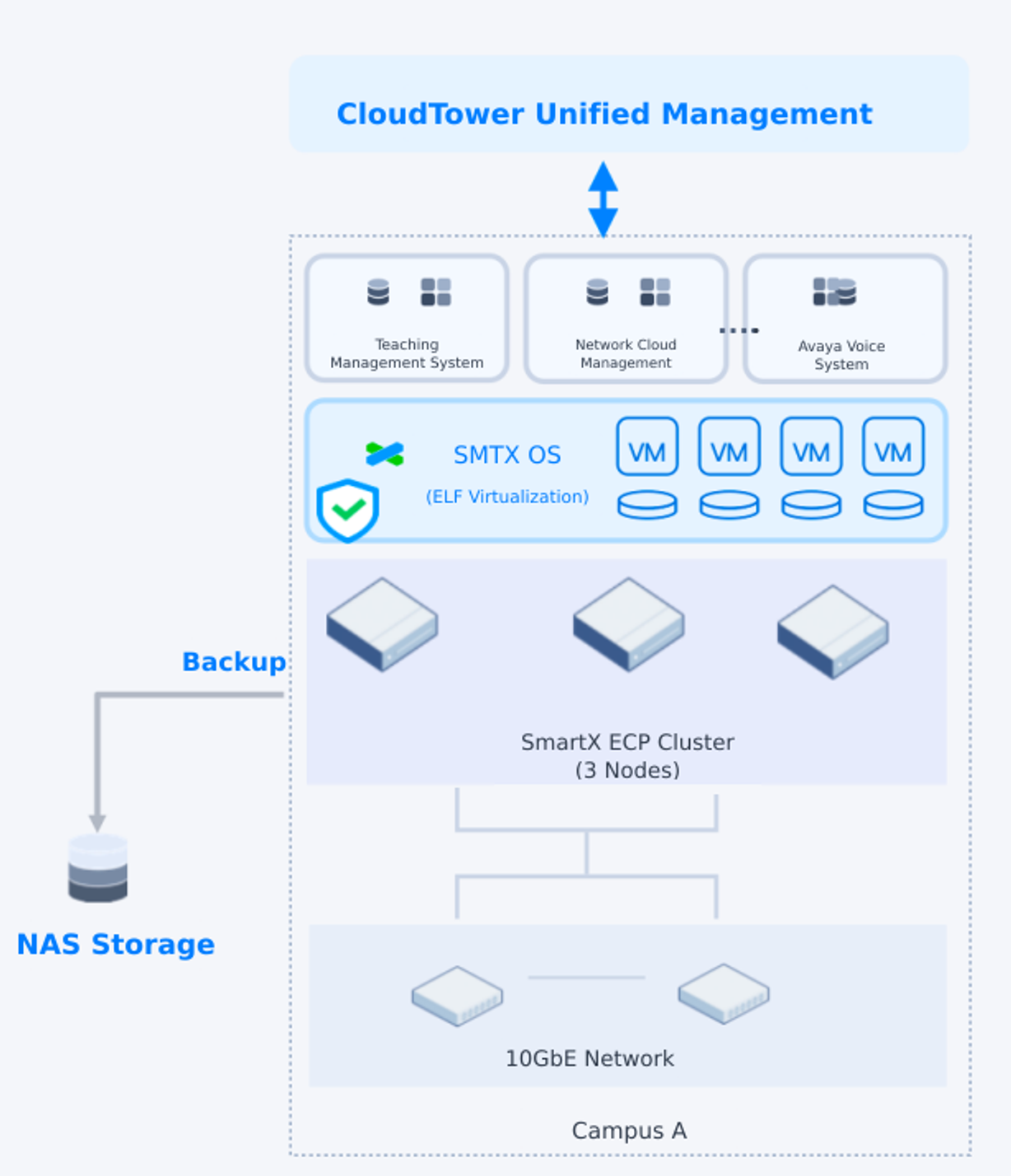
For the initial rollout, the school selected Campus A as the pilot site for VMware replacement. It built a three-node SmartX ECP cluster using software-only SMTX OS and used the SMTX Migration Tool to smoothly migrate all business systems from the existing three-node vSphere + centralized storage architecture to SmartX ECP. These included the teaching management system, Avaya voice system, network cloud management, network monitoring, SMTP, Redis, SQL Server 2012, Active Directory (AD), printing, library management, and other core systems.
- Hardware: Three HPE DL380 Gen10 servers with Intel processors and hybrid-flash storage combining SATA SSDs and SATA HDDs.
- Network: 10GbE NICs.
- Data protection: The school reused its existing Synology NAS storage and integrated it with SmartX’s native backup and disaster recovery component (SMTX Backup & DR). This added a redundant layer of protection for critical business data, preserved the school’s existing investment, and provided a recovery option for ransomware and other risk scenarios.
Major Reductions in Hardware and Software Costs
Replacing the traditional vSphere architecture with SmartX ECP modernized the infrastructure while substantially reducing costs. Compared with the VMware solution, the school cut hardware costs by more than 30% with no need for Fibre Channel (FC) switches or centralized storage, and reduced infrastructure software spending by more than 85% versus the previous VMware solution. The school therefore reduced total cost of ownership (TCO) while making infrastructure spending more predictable.
Higher Hardware Resource Utilization
The school’s workloads generally had modest CPU requirements. On the legacy servers, CPU usage was about 20%, while memory usage was typically 80%-90%. With SmartX ECP, the school can use its built-in Dynamic Resource Scheduler (DRS) and CPU resource optimization capabilities to improve hardware utilization and make fuller use of its HPE server resources.
With hardware costs rising, the school can also host more business VMs for future systems without immediately purchasing additional hardware, further improving utilization and reducing costs.
Smooth, Self-Managed Migration
Using the SMTX Migration Tool, the school combined full and incremental migration to move all 40+ business VMs from the original vSphere platform to SmartX ECP. Except for one older Avaya voice server running a customized RHEL distribution, all other VMs were migrated independently by the school’s IT team, reducing reliance on external implementation resources.
SmartX engineers also provided technical support when migration issues arose. For legacy business VMs, they analyzed logs and VM configurations to quickly identify incompatible virtualization settings. They then helped the school adjust key parameters, including disk controller types, NIC settings, and boot modes, so that the VMs could be migrated successfully. This also helped the school’s IT team gain practical experience in migrating complex legacy VMs and OVA-based VM files.
Significantly Improved IT Operations
- Unified interface: The IT team no longer needs to manage vCenter, NetApp, and other systems separately. Compute, storage, and networking resources can all be managed from a unified SmartX web interface (CloudTower), making day-to-day operations more intuitive and convenient. The SmartX management experience is also similar to vCenter, making it easy to adopt.
- Improved snapshot experience with less business impact: Snapshot operations no longer affect application performance, resolving a long-standing problem under the previous VMware architecture where taking snapshots could cause application lag.
- Simplified backup management while retaining the existing backup strategy: The school can use native SMTX Backup & DR to enable full-VM backups while continuing to reuse its existing Synology NAS and its tiered backup strategy based on business criticality. With backup managed together with SmartX ECP, the IT team no longer needs to switch between multiple interfaces, further reducing routine operational workload.
Future Plans
After validating the feasibility of VMware replacement at Campus A, the school plans to roll out SmartX ECP-based VMware replacement and modernization across its other campuses, creating a repeatable deployment model. Once the SmartX ECP foundation is in place across multiple campuses, the school plans to build a cross-campus disaster recovery system to strengthen its overall backup and DR capabilities.
The school’s requirement for fine-grained access control by department, resource, and operation type is also common among schools, especially multi-campus institutions, as they move toward cloud-based and service-oriented IT operations. SmartX will continue to evolve its products to meet educational institutions’ needs for resource isolation, security, and compliance, turning these common requirements into standardized product capabilities over time.
References:
- Enterprise Cloud Platform – SmartX ECP
- VMware Alternative – SmartX
- SMTX OS Hyperconverged Infrastructure Software – SmartX
- SmartX Migration Tool: Migrate VMware VMs to SmartX
- SMTX Backup & Disaster Recovery: Enterprise-grade Data Protection for Data Center Workloads
- SMTX OS Feature Specifications – SmartX
Recommended readings:
