IT operations teams often face inefficiencies and a high risk of configuration errors when managing large numbers of virtual machines (VMs) on virtualization platforms like VMware. Traditional VM management consoles cannot typically provide visibility into the OS-level status of VMs and do not allow IT teams to consistently modify key parameters—such as hostnames, IP addresses, and DNS settings—across different operating systems.
SMTX VMTools addresses these challenges by enhancing visibility, control, and efficiency in VM management. It simplifies the transition from VMware to the SmartX Enterprise Cloud Platform (ECP), making the switch both easier and more effective.
What Are the Common Challenges for Large-Scale VM Management?
1. Lack of Visibility into VM Runtime Status
Users are typically unable to view real-time status inside VMs—such as IP addresses, hostnames, and DNS settings—directly from the management console. Obtaining this information normally requires manual record-keeping or logging into each VM individually.
Customer Story 1: Lack of Precise Visibility—Full Disk Partition Leads to Business Disruption
On traditional virtualization platforms, a “disk full” alert often lacks detail, making it difficult to identify the specific partition that is running out of space. At Company A, a core business VM suddenly experienced data write failures, leading to frequent application errors. Because the platform displayed only the VM’s overall disk utilization, the IT team could not quickly determine which partition was full. They had to log into the VM for manual investigation, which significantly delayed troubleshooting and resulted in business disruption.
2. Configuration Changes Requiring Guest Login
When users need to modify VM configurations—such as IP addresses, hostnames, or account passwords—they must log into each guest host and make changes manually. This process can be time-consuming and inefficient.
Customer Story 2: Forgotten VM Passwords Force “Breaking the Door”
As more enterprises adopt delegated administration models, password recovery has become one of the most frequent requests for IT operations teams. For instance, at Company B, the IT team provides a unified virtualization platform and base templates, while individual business units manage their own VMs with specific permissions. VM login passwords are set and maintained by business administrators without IT involvement. In such setups, password loss is common—especially for development and testing VMs that may go unused for months. Traditional virtualization platforms make password recovery a cumbersome process: users must request administrator assistance to either boot the VM into single-user mode to reset the password, or mount an ISO image and use a PE tool for manual password modification. Both approaches are complex, require shutting down the VM, and disrupt service continuity.
3. Unable to Manage Complex VM Network Configurations
For VMs using VLAN network adapters with IPv6 or SR-IOV passthrough NICs, network configurations still need to be maintained manually – an error-prone and time-consuming process.
Customer Story 3: Cross-OS Batch IP Update—30 VMs, 2 Hours of Work
As one user vividly put it, “Changing VM network settings feels like defusing a bomb.” At Company C, during a large-scale network migration, the IT team had to update IP addresses, gateways, and DNS configurations on 30 VMs spread across multiple clusters and operating systems. Because each VM had different configuration paths, administrators were forced to log in individually, apply changes manually, and restart services one by one. The process was slow, tedious, and prone to mistakes. In one case, a single missed DNS update caused an upstream application outage—triggering hours of costly troubleshooting.
4. Lack of Snapshot Consistency Assurance
For workloads that require high snapshot consistency, traditional storage-layer snapshots cannot ensure application-level consistency, posing risks to business continuity.
These challenges become more apparent in large-scale VM deployments and multi-tenant environments. To address customers’ needs for VM management in terms of visibility, configurability, and stability, especially in multi-cluster and cross-network environments, SMTX VMTools have been extensively optimized across multiple capabilities to make VM operations more efficient and reliable.
How Does SmartX VMTools Make VM Management Simpler and Smarter?
SMTX VMTools is a toolset that works seamlessly with SmartX native hypervisor – ELF. It enables the management console to monitor, visualize, and control the inner status of VMs, bridging the gap between the virtualization platform and the Guest OS. Natively integrated with CloudTower, SMTX VMTools offers powerful capabilities to help users:
- Quickly access, view, and modify key runtime information inside VMs.
- Enable advanced features such as file-system consistent snapshots.
- Enhance automation and intelligence in IT operations.
Core Capabilities Overview
| Feature | Description |
|---|---|
| VM Information View | Real-time access and display of key internal VM details, including OS name, kernel version, hostname, IPv4/IPv6 addresses, subnet mask, gateway, and DNS server addresses. |
| VM Configuration Modification | Directly modify VM hostname, IPv4/IPv6 addresses, subnet mask, gateway, DNS, NTP settings, user passwords, and time synchronization on restore options from the management platform. |
| Consistent Snapshot Support | Create file-system consistent snapshots to ensure data integrity. |
| Disk Partition Visualization | Display file system mount points, total capacity, usage, and utilization to help quickly assess disk usage inside VMs. |
| Built-in virtio-win Driver | Includes the built-in virtio-win driver for Windows VMs to improve performance without additional manual operations. |
| One-Click Auto Upgrade | Support one-click VMTools upgrade directly from the management platform, keeping the tools always up to date without entering the VM. |
All the above features can be managed directly through the CloudTower without logging into VM’s guest systems—enabling truly visible and controllable management.
Innovations and Product Comparison
| Capability | SMTX VMTools | VMware / Other Traditional Virtualization Platforms |
|---|---|---|
| Cross-OS Compatibility | ✅ Compatible with domestic OS | ⚠️ Largely dependent on open-source agents or plugins |
| Configuration Modification | ✅ Modify directly via the platform without logging in | ⚠️ Often requires SSH and manual scripting |
| Snapshot Consistency | ✅ Supports file-system consistent snapshots | ⚠️ Mostly crash-consistent snapshots |
| IPv6 Management | ✅ Supports IPv6 under SR-IOV/VLAN environments | ⚠️ Often lacks native support or requires manual configuration |
| Platform Integration | ✅ Unified operations and upgrades via CloudTower | ⚠️ Fragmented workflows across multiple tools |
Business Value and Customer Benefits
With SMTX VMTools, users can monitor VM operations in greater detail right from the unified management platform—streamlining IT O&M and strengthening configuration reliability and security:
- Enhanced System Visibility: Delivers an integrated view of each VM’s system details—covering the operating system, IP, gateway, DNS, and file system utilization.
- Improved Configuration Efficiency: Enables enterprises to view key operating system information and remotely adjust settings—such as network, hostname, and NTP—without logging into guest systems. This streamlines manual workflows, improves operational efficiency, and minimizes the risk of human error.
- Ensured Data Consistency: Supports file system consistent snapshots and file system visualization to prevent recovery issues caused by inconsistent data, ensuring reliable rollback and restoration.
- Enhanced Network Management: Allows administrators to view and edit IPv6 addresses for VMs with SR-IOV passthrough or VLAN-based virtual NICs, addressing the complex multi-network setups.
- Deep Virtualization–OS Coordination: SMTX VMTools ensures seamless coordination between the virtualization layer and operating systems—overcoming the limited or disjointed integration found in some platforms. This helps enterprises enhance automation, strengthen security compliance, and maintain business continuity while focusing on creating business value.
- One-Click Auto Upgrade: Upgrade VMTools easily from CloudTower—no need to log in to guest systems. Administrators can launch batch upgrades that run automatically in the background, keeping every VMTool version up to date with the newest capabilities.
Customer Story 1 (Follow-up): When a Full Disk Partition Threatened Business, SMTX VMTools Solved it in Minutes with Visibility and Alert Capabilities
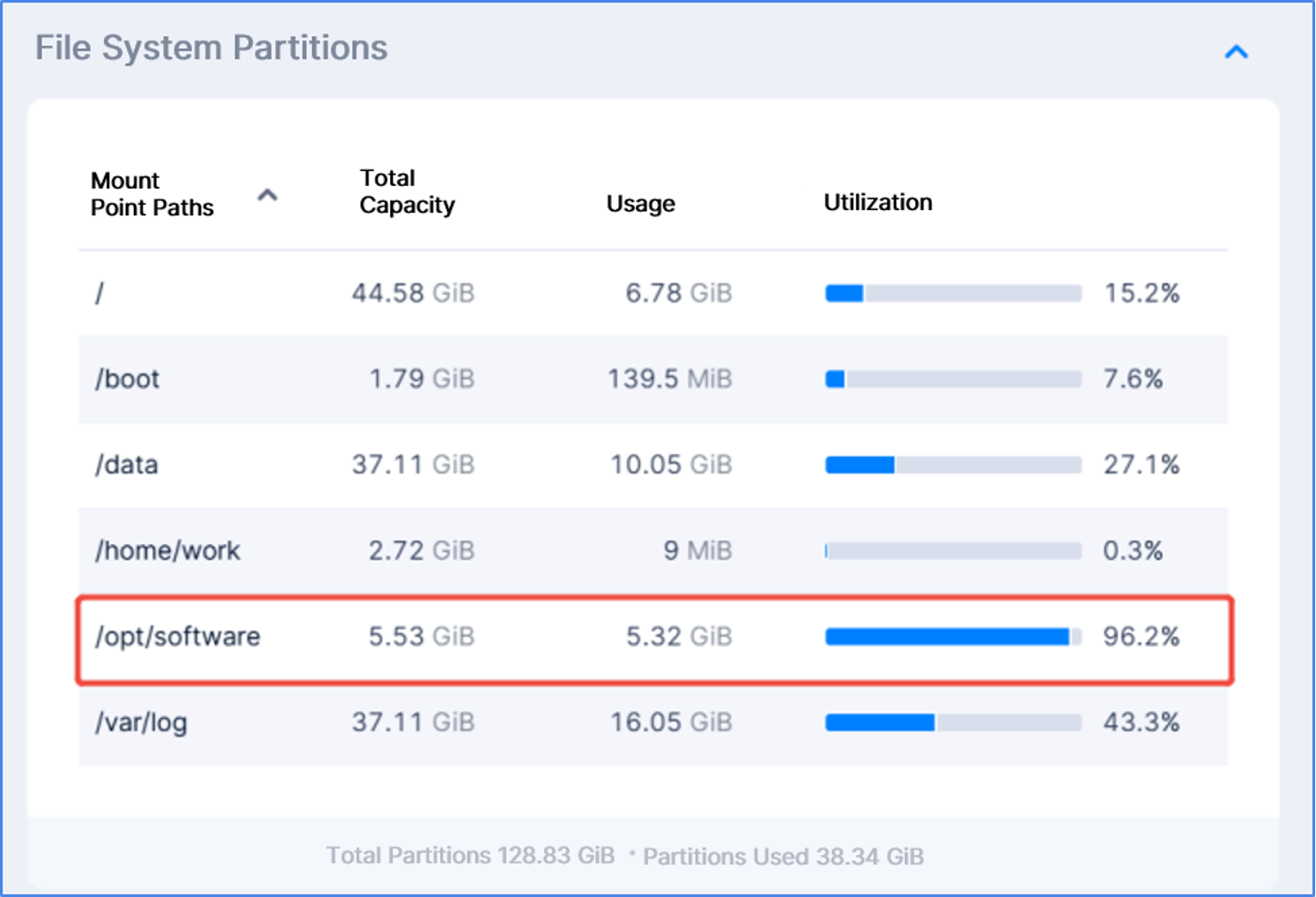
As we mentioned earlier, Company A once faced a tricky situation—a VM’s disk had run out of space while the monitor system could not tell which partition was responsible. After installing SMTX VMTools and collaboratively using the CloudTower’s Observability platform, the team customized alert policies for file system utilization. Once a disk partition hit 90% usage, an alert popped up automatically.
With VMTools’ intuitive visualization, the team could instantly see every mount point’s path, total capacity, and usage. They quickly spotted the culprit: the /opt/software partition used for business data writes. Acting before it hit 100%, they prevented a shutdown that would have halted key data transactions.
By combining the “visibility” provided by VMTools with the “alerting” capabilities of the observability platform, the operations team caught the issue before it could disrupt any service. In just a few minutes, they expanded the disk partition and stabilized operations—helping the enterprise shift from reactive to proactive IT O&M.

Customer Story 2 (Follow-up): Forget Passwords Frequently? SMTX VMTools Enables One-Click Reset
Company B used to deal with constant password reset applications from business users. After deploying SMTX VMTools, administrators could reset any user password directly from CloudTower—no need to log into the guest system or reboot the VM. Once reset, users could log in right away. With this capability, forgotten passwords are now resolved instantly through a secure, closed-loop process.
Customer Story 3 (Follow-up): Cross-OS Batch Configuration? Done in 10 Minutes with SMTX VMTools
Tired of manually updating network settings across multiple operating systems, Company C installed SMTX VMTools on their VMs. With CloudTower, administrators could directly view and modify network configurations for all VMs—without worrying about OS types or logging into each VM. In just 10 minutes, 30 VMs were fully reconfigured with zero downtime. The process was simple, visible, and efficient, saving significant time and preventing human error.
More information on ELF virtualization and related features:
Replacing VMware vSphere with SmartX ELF: Higher Availability with Optimized Performance
Accurate and Effective: Virtual Machine High Availability in SMTX OS
Why Enterprises Choose SmartX ELF Virtualization as a VMware Alternative: Five Customer Stories
Improving Resource Utilization: Innovative Implementation of DRS in SmartX HCI
GPU Passthrough & vGPU: Using GPU Application in Virtualization with SMTX OS 5.1
