Replacing VMware is not just about selecting a new virtualization platform—the real challenge lies in how efficiently and reliably virtual machines (VMs) can be migrated across environments. To address this, SmartX provides the SMTX Migration Tool, a v2v solution designed for seamless cross-platform VM migration. It enables the transfer of workloads from VMware ESXi environments to SmartX ECP, powered by its native virtualization platform (ELF).
In this article, we take a closer look at the technical principles behind the SMTX Migration Tool, focusing on its snapshot-based full data copy, incremental synchronization during cutover, and post-migration validation process, to explain how VM migration is actually executed in enterprise environments.
SMTX Migration Tool Overview
As a cross-platform VM migration tool, the SMTX Migration Tool offers the following advantages:
- Supports flexible deployment and can be deployed on either the source or target virtualization platform.
- No agents are required on the VMs to be migrated, with support covering mainstream operating systems such as Windows and Linux.
- During migration, VMs can remain online with rollback capabilities; only a brief downtime is required during incremental data synchronization, minimizing service disruption.
- Supports both single and multiple migration tasks, enabling efficient planning and reducing overall migration time.
Migration Workflow of the SMTX Migration Tool
The overall workflow of the SMTX Migration Tool is illustrated below. The tool performs data transfer by automatically creating snapshots, enabling VM migration with minimal service disruption. During the migration process, each VM migration task is matched with a task. From creation to completion, a task goes through multiple stages, including task creation, full data migration, incremental data migration, driver injection, VMTools installation, and network configuration.
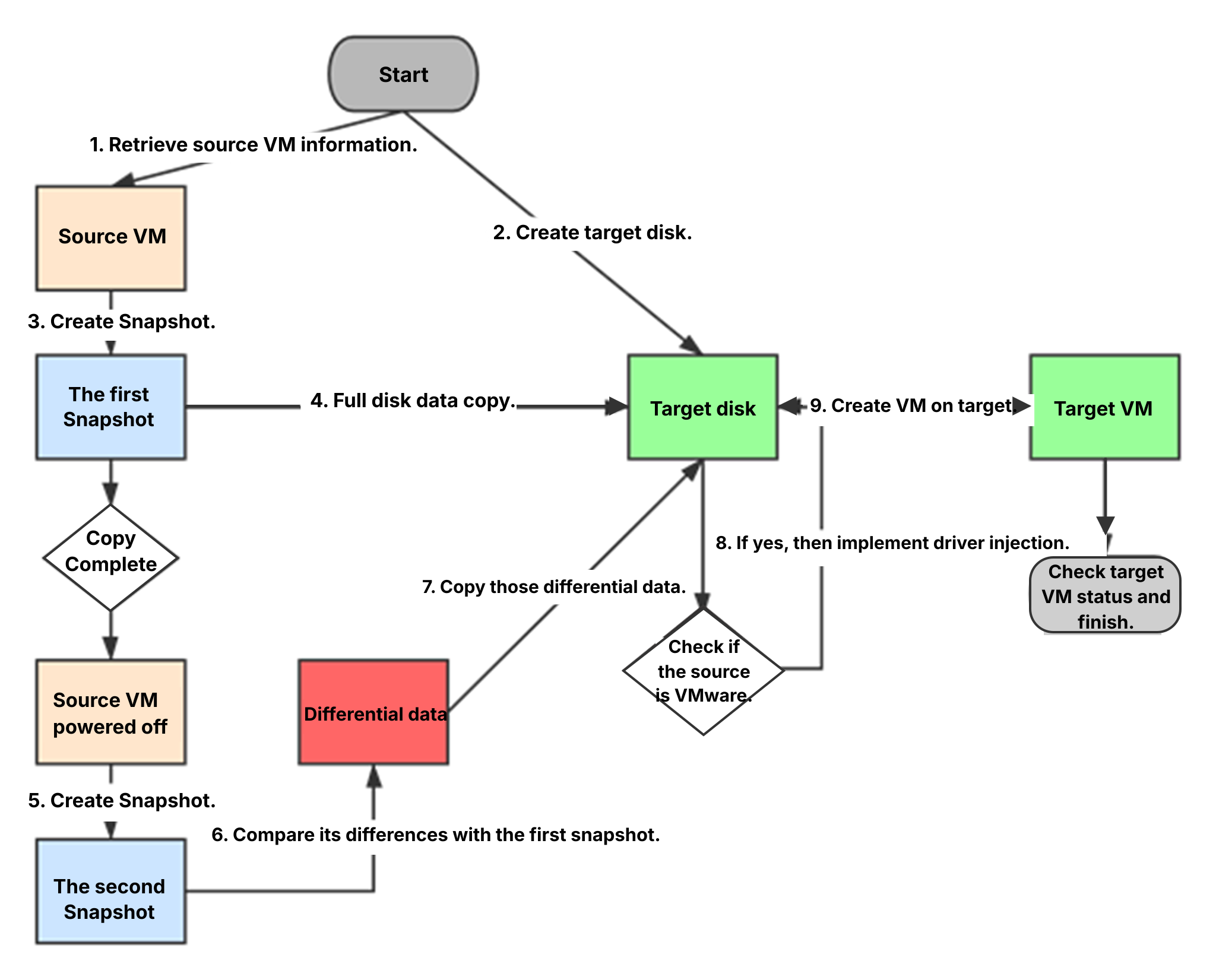 At the start of migration, the system retrieves information about the source VM and creates the target virtual disk on the target VM. It then automatically creates the first snapshot and uses VMware APIs to obtain the valid disk data regions in the snapshot, performing a full data transfer to the target VM disk.
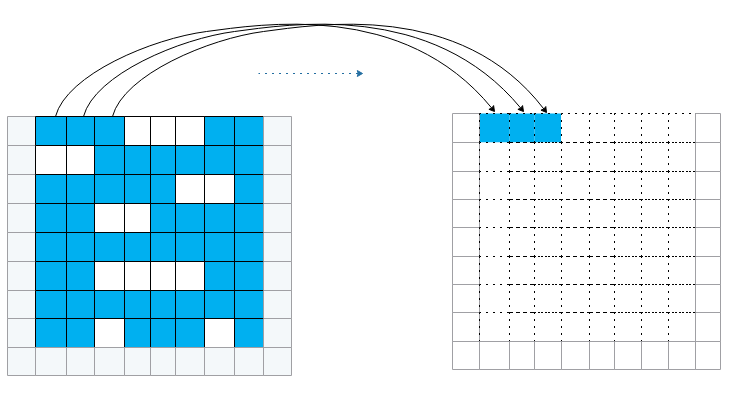
Full data migration
Full data migration is the initial stage in which all disk data from the VM snapshot is transferred. After completion, the source VM is prompted to shut down, and a second snapshot is created.
Incremental data migration follows, transferring the differential data between the two snapshots, also known as the Cutover phase. Once the full migration phase of a task is completed, the system checks the VM status to determine whether to proceed with Cutover. If the VM is already powered off, Cutover starts immediately; otherwise, it waits for the user to shut down the VM and then triggers the Cutover process via an HTTP request.
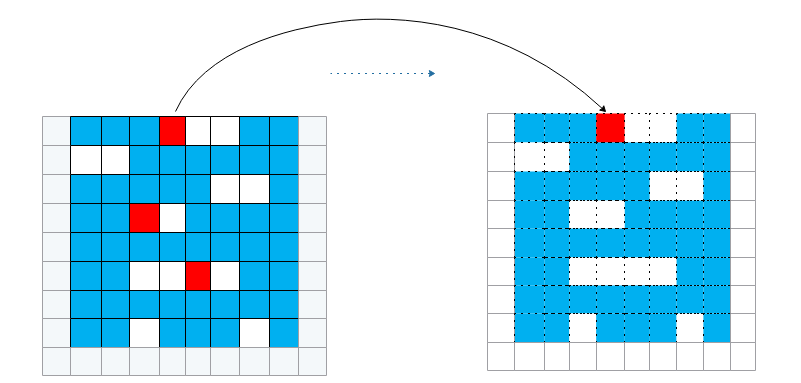
Incremental data migration
In addition, once the full data transfer is complete, users can manually synchronize incremental data without downtime. This allows most incremental data to be replicated while the VM remains online, significantly minimizing the final cutover window.
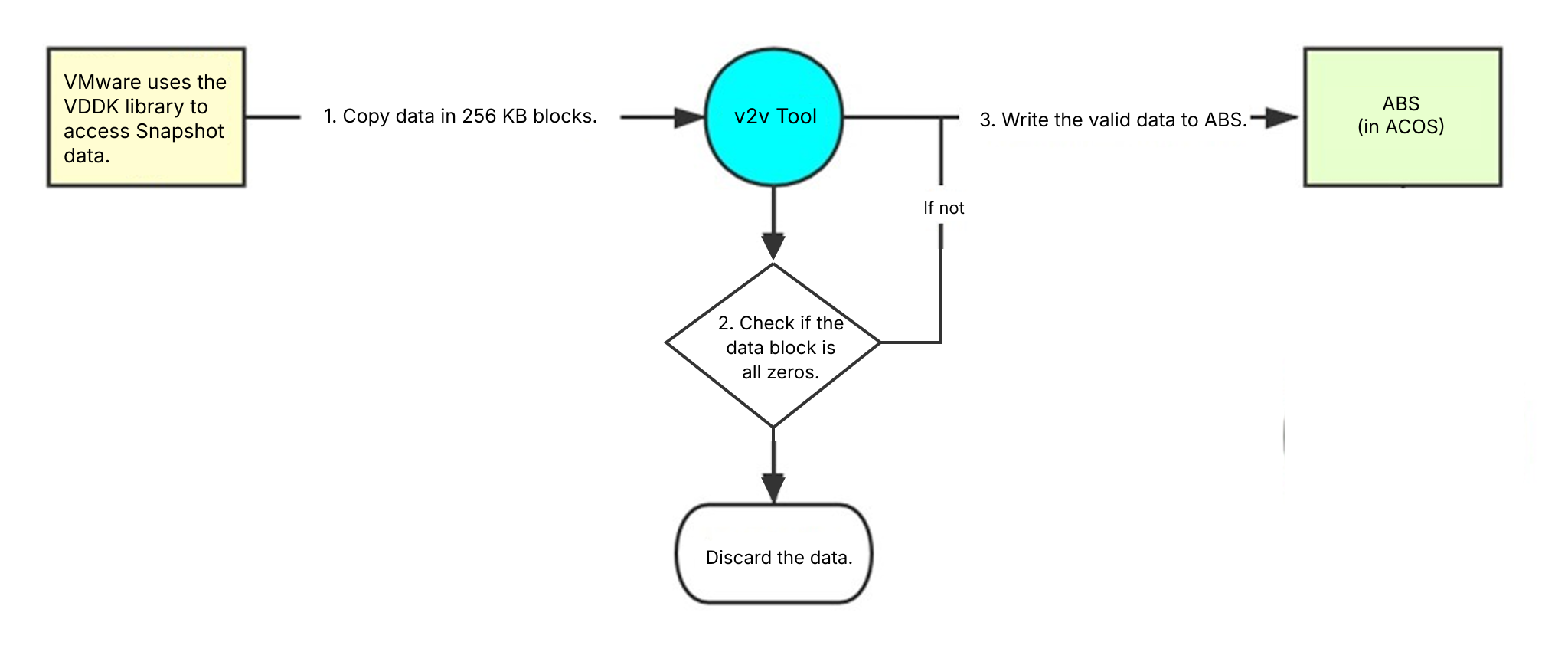
Regarding the data transferring amount, the SMTX Migration Tool reads data in 256 KB blocks, processing each block immediately without caching. During full migration, the entire valid data region is transferred from the source to the migration tool, while only the non-zero blocks of the valid data region are sent from the migration tool to the target disk, improving migration efficiency.
After the incremental data transfer is complete, the system determines whether driver injection is required. VMs on the VMware platform use proprietary drivers for the Guest OS, while VMs on the ELF platform use standard Virtio drivers. SMTX Migration Tool will automatically inject the Virtio drivers. Once data migration is finished, the necessary configuration and checks are performed on the target VM to ensure it is running correctly, completing the migration process.
To further explore VMware migration, modernization, and replacement across the infrastructure stack, see the following resources:
Migrating VMs from VMware to Alternative Hypervisor: An Ultimate Guide
Replacing VMware NSX with SmartX Everoute: Comparable Capabilities with Simpler Operations
Replacing VMware DR with SMTX Backup & DR: Integrated DR System with Simplified O&M
Replacing VMware Tanzu with SmartX SKS: Streamlined Operations and Superior VM-Container Management
Replacing VMware vSphere with SmartX ELF: Higher Availability with Optimized Performance
VMware Replacement in 15 Hospitals: Supporting Core Applications and Databases with SmartX ECP
