When evaluating VMware alternatives, many enterprises prioritize the disaster recovery (DR) capabilities to ensure data security and business continuity.
As the DR module of the SmartX Enterprise Cloud Platform (ECP), SMTX Backup & Disaster Recovery not only provides core functionalities on par with VMware in virtual machine (VM) replication and fault recovery orchestration, but also integrates advanced features like native backups, seamless cross-site network failover, and sandbox testing. These features enable users to build a comprehensive and unified disaster recovery system, making the domestic replacement of VMware both “reliable” and “user-friendly.”
In the following sections, we will compare the key features of SMTX Backup & Disaster Recovery with VMware’s disaster recovery components and share real-world customer stories in VMware replacement.
How Well Does SMTX Backup & Disaster Recovery Compare to VMware Disaster Recovery Components?
SMTX Backup and Disaster Recovery offers native backup and recovery capabilities for the SmartX ECP, along with replication and recovery features that align with the key functions of VMware’s disaster recovery components, such as vSphere Replication and Site Recovery Manager (SRM). Since VMware lacks a native backup solution, the table below compares the core DR functionality between SMTX Backup & Disaster Recovery and VMware products.
Comparison of Protection Approach
| Feature | VMware | SmartX |
| Backup | ❌ | ✅ Minimum RPO of 15 minutes |
| Asynchronous Replication | ✅ Minimum RPO of 5 minutes | ✅ Minimum RPO of 15 minutes |
| Synchronous Replication | ❌ | ⏳Coming Soon Minimum RPO of 0 |
Comparison of Replication Features
| Feature | VMware | SmartX |
| Replication Object | VM granularity | VM granularity |
| Reverse Replication | ✅ | ⏳ Coming Soon Supports reverse replication during replica operation |
| Permanent Incremental Replication | ✅ | ✅ |
| Site-to-Site Replication | ✅ | ✅ |
| Recovery Point Consistency | ✅ Default crash consistency Application consistency requires reliance on Windows VSS | ✅ Supports file system consistency and crash consistency |
| Customizable Recovery Points | ✅ | ✅ |
| Replication Seed | ✅ Accelerates full replication, significantly reducing data transfer volume | ❌ |
| Replica Object Redundancy Policy | ✅ Supports customization, including: RAID 1 (2/3/4 replicas), RAID 5 (EC 3+1), RAID 6 (EC 4+2) | ✅ Supports customization, including: 2/3 replicas, 28 combinations of EC K+M: M = 1 or 2, K=2~22 (even) M = 3 or 4, K 4~8 (even) |
| Replica Object Network Configuration | ✅ Supports configuring VLAN/NSX network types | ✅ Supports configuring VPC, VLAN network types |
| Replica Object Data Encryption | ✅ | ✅ |
| Network Throttling | ❌ Does not monitor task bandwidth | ✅ Supports setting task transfer speed limits for load control |
| Transmission Encryption | ✅ Supports TLS general protocol | ⏳ Coming Soon Supports TLS general protocol |
| Transmission Compression | ✅ | ❌ |
Comparison of Failure Handling Features
| Feature | VMware | SmartX |
| Failover | ✅ Supports automatic and manual failover | ✅ Supports manual failover |
| Failover Network High Availability | ✅ Depends on NSX for seamless network switch | ✅ Depends on Everoute VPC for seamless network switch |
| Disaster Recovery Drills | ✅ Supports starting replica VMs in an isolated network | ✅ Supports generating test VMs for verification |
| Operations After the Original Object is Unrecoverable | Manually switch secondary site to primary and detach from recovery plan | Enables permanent failover to promote replica VMs into production and remove the associated replication plan automatically |
| Virtual Machine Startup Sequence and Interval | ✅ Supports pre-configuration in the recovery plan | ✅ Supports manual configuration during failover |
Comparison of O&M Features
| Feature | VMware | SmartX |
| Task Report | ✅ Provides logs and reports based on recovery plan execution granularity | ✅ Automatically generates statistical reports based on task execution records and supports report export |
| Task Result Notification | ✅ | ❌ |
| Pre/Post Task Execution Scripts | ✅ | ❌ |
| System Monitoring and Alerts | ✅ Relies on vRealize Operations | ✅ Relies on Observability Platform |
What Are the Advantages of Replacing VMware with SmartX ECP in Disaster Recovery?
Unified Platform: Simplified O&M with Improved Efficiency
- Native Backup & DR Capabilities Provided by One Platform: SMTX Backup and Disaster Recovery provides data backup and disaster recovery together, supporting long-term retention, version management, accidental deletion recovery, and rapid failover. It also delivers capabilities of business continuity and fast failover.
- Centralized Resource Management: Backup and DR policies, along with required storage, networking, and compute resources, are centrally managed via CloudTower. No additional tool integration is needed, making deployment, configuration, and troubleshooting much simpler.
- Reduced Total Cost of Ownership (TCO): Eliminating redundant licenses and third-party software costs, combined with streamlined O&M, significantly lowers long-term investment and maintenance expenses.
- Minute-Level Recovery: With built-in orchestration, failover can be triggered with one click, automatically managing VM boot order, delays, network switching, and IP mapping to minimize RTO.
Flexible Scenario Coverage: Adapting to Multiple Business Demands
- Network Auto-Adaptation in Failover: Replica VMs are automatically assigned networks and IPs according to predefined rules, fitting different DR deployment architectures while reducing manual workload and ensuring business continuity.
- Comprehensive Recovery Options: Supports emergency, planned, and permanent failovers, covering use cases from testing to production migration.
- Fast Site-to-Site Recovery: In case one site is disrupted, workloads can be restored from another site with minimal downtime, boosting overall DR efficiency.
Integrated with Networking & Security: Stronger Protection with Faster Recovery
- Embedded Security Capabilities: With CloudTower and Everoute, features like VPC, traffic visualization, anomaly isolation, and sandbox testing are natively integrated into backup and DR workflows.
- Seamless Failover Networking: Leveraging Everoute VPC, failover can occur without IP or routing changes, ensuring uninterrupted service recovery.
- Boosted Security & Efficiency: Automated network failover combined with dynamic security policies enhances both recovery speed and protection levels.
How Do Enterprises Build DR Systems With SMTX Backup & DR and Replace VMware?
A Financial Services Company: A Simpler Alternative to VMware for Intra-City Datacenter DR and IT Localization
As part of a business upgrade initiative, a financial services company launched new systems such as data governance, which required cross–datacenter disaster recovery to ensure business continuity and data protection. Since the applications themselves lacked native DR protection, the company needed DR capabilities to be delivered at the infrastructure layer.
Initially, the company considered a traditional VMware-virtualization-and-centralized-storage–based solution. However, this approach presented clear challenges in both cost and complexity: data replication operated at the LUN level, without VM-level granularity, forcing administrators to perform complex storage planning and recovery configurations. Furthermore, the reliance on foreign hardware and software failed to meet long-term IT localization and autonomy requirements.
While exploring alternatives, the company discovered the advantages of SmartX ECP, including rapid deployment, simplified operations, and flexible replication. It began evaluating intra-city DR solutions built on SmartX ECP. During the POC stage, multiple HCI vendors were brought in for rigorous testing, covering reliability, stability, performance, workload migration, and—most importantly—the ability to support datacenter-level failover.
Given that the new systems were non-transactional, there was no need for real-time replication (RPO=0). Instead, the company sought to reduce replication frequency to lower resource consumption. As a result, asynchronous replication was identified as the optimal solution.
After extensive validation, the company selected SmartX ECP (with native hypervisor – ELF) for intra-city datacenters DR. Two ECP clusters, deployed on Hygon-based servers across two data centers located 25 km apart, host the company’s new business applications along with related components like domestic databases and middleware. The data centers are interconnected at Layer 2 via a 10Gb bare fiber, sharing both application traffic and replication flows. Leveraging SMTX Backup & DR for replication and recovery orchestration, the company achieves datacenter DR with RPO ≥ 15 minutes and RTO in minutes, ensuring resilient and compliant business continuity.
A Financial Investment Institution: Replacing VMware vSphere and NSX with SmartX ECP to Enable Cross-DC DR Between Heterogeneous Clusters
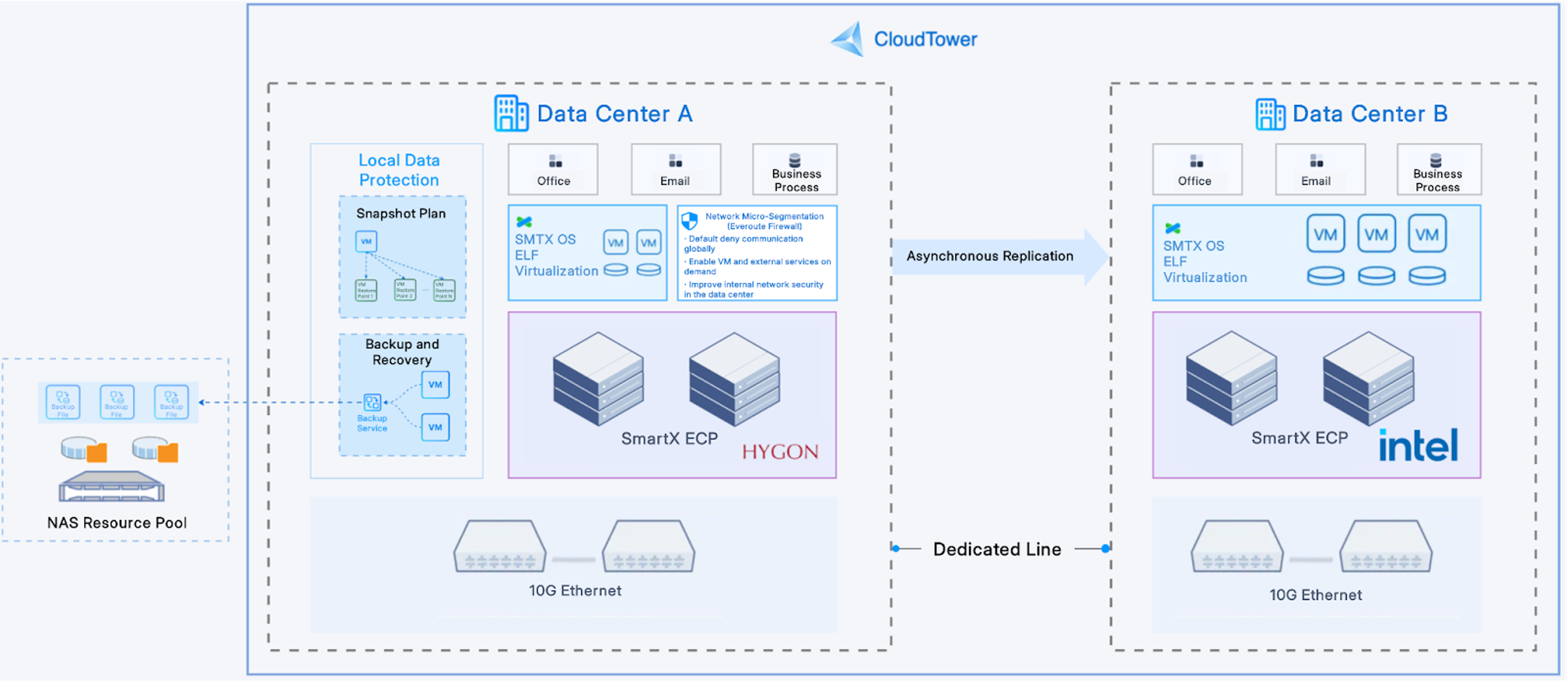
A leading investment firm originally relied on VMware virtualization and NSX to support its production systems. In response to the growing trend of IT localization, the firm decided to adopt domestic hyperconverged software and hardware to build a new production cluster. At the same time, it repurposed the hardware from its original VMware cluster to set up a DR cluster, ensuring the stable and continuous operation of the new clusters.
After extensive testing and evaluation, the customer chose to build a localized IT infrastructure using SmartX ECP, powered by its native hypervisor ELF, and deployed on Hygon-based servers. At the same time, the customer replaced VMware NSX with Everoute and introduced SMTX Backup & DR to provide double data protection for the production environment:
- By deploying Everoute’s distributed firewall, the customer enabled 3 layers of interconnection within the data center and implemented microsegmentation protection for data traffic.
- With SMTX Backup & DR’s replication and recovery features, data from the production environment is replicated to a SmartX ECP-based DR cluster built on the customer’s existing VMware hardware (Intel-based servers). In addition, VMs in the production environment are backed up to repurposed NAS storage, ensuring data availability while reducing the overall cost of DR.
>>Learn more: Replacing VMware NSX with SmartX Everoute: Comparable Capabilities with Simpler Operation
An Insurance Asset Management Firm: Replacing VMware Virtualization and Enhancing DR Drill Effectiveness
To improve DR drill effectiveness while pursuing IT localization, an insurance asset management firm built two SmartX ECP clusters (based on ELF virtualization) on Intel- and Kunpeng-based servers.
Using the SMTX Migration Tool, the company steadily migrated its VMware VMs to the ELF platform. Each cluster was paired with a dedicated DR environment: through SMTX Backup & DR, production VMs from the primary data center are replicated to a DR site for protection, with a 12-hour interval configured according to business requirements. Replication is achieved via a 150 Mbps dedicated line, and DR drills can be conducted on demand.
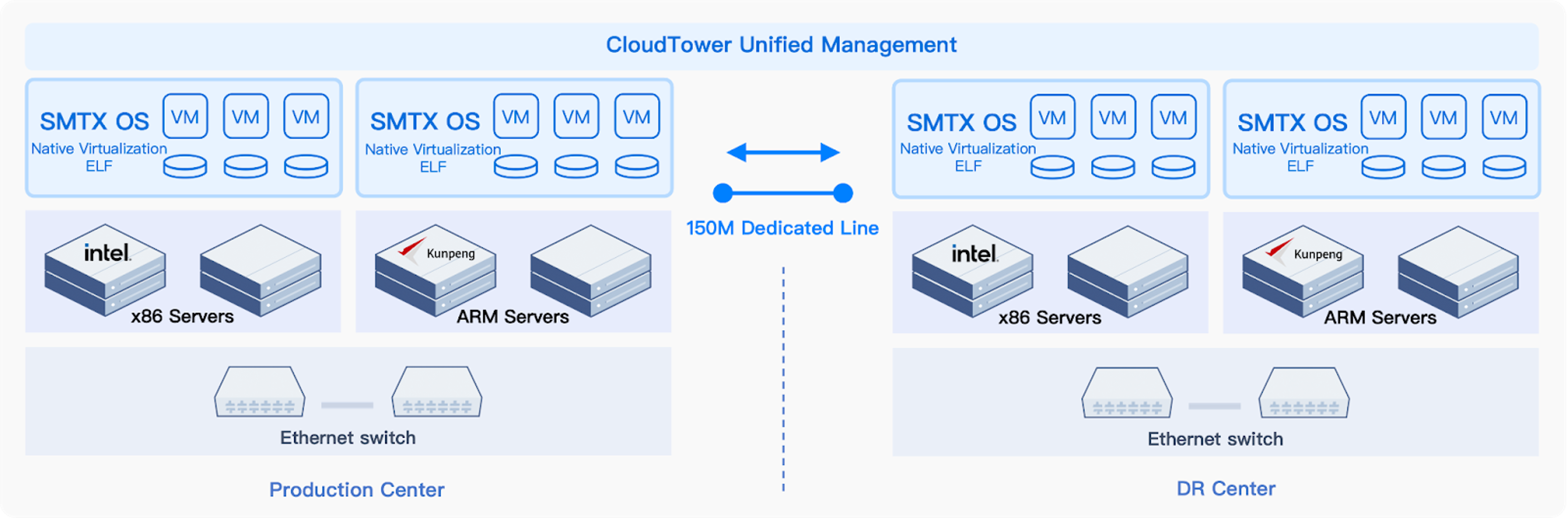
With the new architecture, both production and DR sites are supported by SmartX ECP, enabling central management across heterogeneous CPU clusters. This streamlined infrastructure not only facilitated the transition from VMware to a domestic platform but also enhanced operational simplicity. Besides, after introducing SMTX Backup & DR, the firm can complete DR failover within just 30 minutes using only a few simple steps. This not only meets the RTO targets for DR drills but also eliminates the need for complex, manual operations—significantly improving both efficiency and reliability.
You can find more information on SmartX & VMware component comparisons from our previous blogs:
Replacing VMware vSphere with SmartX ELF: Higher Availability with Optimized Performance
Replacing VMware NSX with SmartX Everoute: Comparable Capabilities with Simpler Operations
Replacing VMware Tanzu with SmartX SKS: Streamlined Operations and Superior VM-Container Management
More VMware alternatives cases:
Four Case Studies Disclose How to Replace vSAN and VMware HCI with SmartX HCI
Why Enterprises Choose SmartX ELF Virtualization as a VMware Alternative: Five Customer Stories
SmartX ECP in Healthcare: Running Core Systems and Databases, Replacing VMware and Nutanix
From VMware to SmartX ECP: The Cloud Native Journey of Zigong First People’s Hospital
ConnectWave: Boosting O&M Efficiency and Cost-Efficiency of IT Infra with SmartX HCI
Zheshang Securities: An Ex-User of VMware and Nutanix HCI Embraces SmartX HCI


